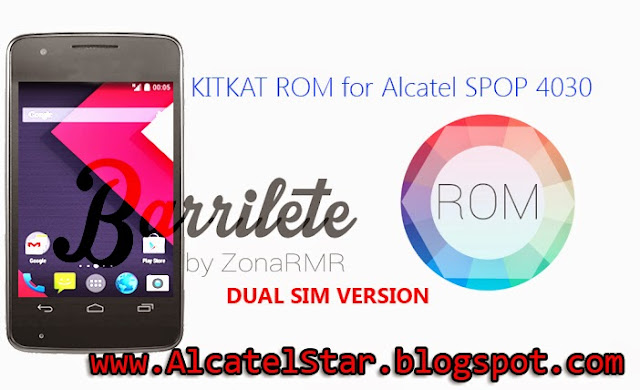
KitKat ROM for Alcatel SPOP 4030 single/dual sim - Barrilete ROM

Get the ROM of Android KitKat on your Alcatel SPOP 4030/GLORY2 single or dual sim.
This ROM is themed 99% like Android 4.4 KitKat, it brings amazing looks from original KitKat version almost indistinguishable to the original.
Specially it's developed for dual sim version of device but it works seamlessly on single sim variant.
I'm think it's the best aftermarket ROM available yet for Alcatel SPOP 4030/GLORY2, also more than stock ROMs.
Barrilete KitKat edition is stable ROM with fastest & smoothest running with with the possibility of hard-multitasking.
Do not worry about lag or low RAM slowdown, these things do not appear or just not happening.
By the end you will not make a mistake if you install this ROM on your Alcatel SPOP.
kitkat fast rom on alcatel one touch spop 4030 glory 2

Features:
  • Fastest and smoothest compared with stock
  • Android 4.4.2 ( 4.1.2 real )
  • Themed like Android KitKat
  • KitKat roboto font
  • Original KitKat Icons
  • Rooted
  • Zipaligned
  • Fully Deodexed
  • Busybox integrated
  • Gradient statusbar
  • Init.d support
  • Google camera(which is present in Android AOSP)
  • Multilang support
  • Build.prop tweaks
  • Tweaks for lag, speed, multitasking
  • Bravia Engine 2 improvement of camera photos

Some screen shots from ROM

super fast android kitkat rom for alcatel spop 4030 glory2 barrilete

Installation of KitKat ROM on Alcatel SPOP - 4030:


You need from CWM or TWRP recovery check out this post.
Download ROM from below and put into your sdcard.
  • If you're using CWM follow these steps:
  1. Boot into CWM
  2. note: Before anyhing make a full backup of your current ROM because everything will be erased (go to backup and resotore then backup ROM)
  3. Then Wipe data/cache
  4. Select install zip from sd and find ROM zip (Barrilete ROM Dual Edition v1.2.zip)
  5. Wait zip to be installed on your device.
  6. That's it all just reboot system now and enjoy of ROM
If you're with TWRP recovery follow steps below:
  1. Boot into TWRP
  2. Go to "WIPE" button and select factory reset
  3. Go back and select "INSTALL" button find ROM zip and install
  4. Wait some time for installation!
  5. You can reboot now!
note: first boot can take some time don't worry it's normal just be patient!


Download Barrilete KitKat ROM for Alcatel SPOP - here

Barrilete Custom ROM for Alcatel SPOP 4030

custom rom for alcatel spop barrilete rom

Barrilete is Custom ROM for Alcatel SPOP 4030A based on stock Android 4.1.1.
Get some cool custom ROM for your Alcatel One Touch SPOP.
Barrilete has some of general distinctive qualities as: Beauty, Speed & Responsiveness.
No more lag or tardiness due to less RAM memory and slow CPU, it is optimized for faster and smooth running equipted with best tweaks & improvements to freeing more RAM on your Alcatel.
ROM installable throught AROMA installer for easy installation for newbies.

note: It's only works with one sim version of device.


Some of main features:

  • Beautiful & Faster
  • Based on Android 4.1.1 Jelly Bean
  • Init.d Support (native into kernel)
  • Build.prop tweaks and improvements
  • Fully Deodexed
  • Rooted (SuperSU)
  • Zipaligned
  • Busybox (Stericson)
  • HoloUI - Cool Design
  • KitKat Icons
  • Exclusive Wallpaper
  • Cleaned from bloatware
  • Ad blocking
  • Gapps included (no need to install)
  • Increased SD Card read-ahead cache to 2048 KB
  • Sqlite optimizations
  • Entropy generator engine used to reduce lags
  • Linux kernel tweaks and improvements for better performance and battery life

rom alcatel spop barrilete v2

HOW TO INSTALL:

You need to had from Recovery like ClockWorkMod or other custom Recovery check out this post for CWM on Alcatel SPOP.

After flashing CWM recovery on your Alcatel SPOP proceed to installation of ROM.
Before anything to be changed due to installing custom ROM we recommended to make backup of your ROM from CWM recovery.
  1. Download Barrilete ROM from link - here and put into root of your SD.
  2. Boot into CWM recovery.
  3. Removing old data:
    - Wipe data/cache from menu.
    - Wipe dalvik cache from advanced.
  4. Flashing ROM into /system & /custpack partitions:- Install zip from sd then select / Barrilete ROM v2.0.zip /.
  5. Now you can reboot your device!
note: Please be patient, until device booted it's normal because Android building data files approximately over 2-3min!

developer: ZonaRMR | source: XDA

REAL GALAXY ROM BY KUASHA PRANTO

Have a Look!!!! Here's the ScreenShots of REAL GALAXY ROM


DEVICE : WALTON PRIMO E2 (MTK6572)

YOU CAN ABLE TO PORT IT FOR YOUR MTK6572 DEVICE :D 

ROM MODER : KUASHA PRANTO 


FEATURES :


1. REAL GALAXY FEEL

2. SMART DUAL SIM
3. NOTE 3 S5 ICON MIX
4. GOTHIC STOCK FONT
5. GALAXY UI
6. TOUCHWIZ HOME
7. TOUCHWIZ DIALER,MMS
8. SAMSUNG APPS
9. MOBO MARKET ADDED 
10. FAST AND STABLE
11. FX BOOSTER
12. SAMSUNG KEYBOARD
13. DUAL 3G
14. LATEST SU ADDED 
15. Zipalliagn at every boot
16. BusyBox ADDED
17. NITROLAG NULIFIER ADDED :D 


BUG : NOT FOUND (IF U PLZ KNOCK ME )


FLASHING METHOD : NORMAL AS LIKE OTHER ROM.FULL WIPE THEN FLASH. DO NOT USE TWRP.WIPE CACHE AND DALVICH CACHE


CREDITS :

1. ALL ANDROID USERS


2. ALL ANDROID DEVS


3. XTREAM ORNOB

4. SHEHZAD MAHI


5. SNIGDHO HASAN

6. AKIB

7. EMRUL CHOWDHURY

8. ME :p


ROM LINK :  Click Here


         A DEVELOPMENT WORK BY KUASHA PRANTO     

DARK ANGEL BY KUASHA PRANTO

DEVICE: WALTON PRIMO E2(MT6572)
YOU CAN ABLE TO PORT IT FOR YOUR MTK6572 DEVICE

Features
  • Based on 4.3
  • 100% Bugless
  • A mixed look
  • No more bothred same style
  • Fully Deodexed
  • Pre-Rooted
  • Dual 3G Swipe Support
  • Super Smooth UI
  • 3G Video Call Support
  • Improvements in build.prop
  • Better Camera Quality
  • Better Audio
  • Ram Optimization Tweak
  • King's Smoothness Tweak
  • ViperFX Added
  • 4.3 Gapps included
  • BusyBox installed
  • Full Gravity Box Supported
  • KK mixed framework
  • New Icons
  • All HD Game played Smoothly
  • and MUCH MORE !!!!!!!!!!!!!!!!!

DOWNLOAD ROM Click Here

SCREENSHOTS


SUPERNOVA RELOADED V3 BY KUASHA PRANTO


DEVICE : WALTON PRIMO E2 (MTK6572)

YOU CAN ABLE TO PORT IT FOR YOUR MTK6572 DEVICE 


ROM MODER  Kuasha Pranto 

FEATURES:
  • 4 in 1 boot animation
  • 6 built in font
  • dual 3g
  • 3 in 1 UI
  • GALAXY S5 ui
  • XPERIA Z2 ui
  • CUSTOM V3 ui
  • GALXAY S5 notification,dialer,settings
  • XPERIA Z2 notification,dialer,settings 
  • CUSTOM V3 notification,dialer,settings
  • DOLBY SOUND OPTIMIZER (Better thn VIPER4FX )
  • GOOGLE keyboard
  • SUPER SMOOTH
  • Gaming ROM
  • Zipalliagn at every boot
  • BusyBox ADDED
  • NITROLAG NULIFIER ADDED 


BUG : NOT FOUND (IF U PLZ KNOCK ME )

FLASHING METHOD : NORMAL.FULL WIPE THEN FLASH. DO NOT USE TWRP


DOWNLOADS

ROM LINK  Click Here

SUPERUSER PATCH   Click Here

SCREENSHOT  Click Here


CREDITS 

  • ALL ANDROID USERS
  • ALL ANDROID DEVS
  • XTREAME ORNOB
  • SHEHZAD MAHI
  • SNIGDHO HASAN
  • AKIB
  • EMRUL CHOWDHURY
  • ME :p


How to boot into Safe Mode Alcatel STAR & IDOL

enter in safe mode alcatel star idol xpop mpop

In this post I will describe how to boot into Safe Mode on Android device Alcatel STAR, IDOL, XPOP, MPOP and others and actually for what it's used.
Мany Windows users know Safe Mode is a place where you can uninstall, install, remove something like Repair center.
So on Android Safe Mode is the same if your phone makes the problem of the nature of force close you need to perform this action.On Safe Mode all third pary apps are disabled and you can uninstall if you think there is a problem on some apps that you installed earlier.After rebooting in normal mode all apps will be restored at normal state.

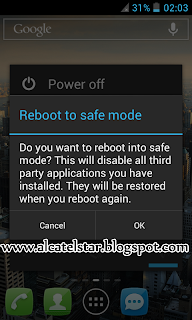
  1. To boot into Safe Mode you need to Hold Power off button on power menu like on screen shot.
  2. Will be appear new window with message "Do you want to reboot into Safe Mode ? and you need to confirm to reboot into Safe Mode.
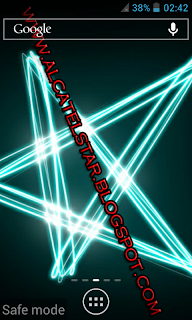
  3. When phone booted into Safe Mode at bottom right cornel will display the caption "Safe Mode" this means that you are Safe Mode then I hope you know what you are doing.

reboot into safe mode android alcatel star

boot into safe mode alcatel star idol
safe mode boot android alcatel star idol

Xposed Framework beautify your phone without modifiying any apk

xposed framework change your android look easily

What's excatly Xposed Framework ?
It's App that modify your Android User Interface like statusbar tweaks, display tweaks, navigation bar tweaks, phone tweaks, media tweaks, power tweaks, hardware keys tweaks, advanced power menu(I mean reboot to recovery, shutdown, reboot) changing icons, changing colors of statusbar, transparent notification bar, turning capacitive buttons for notifications and many many more awesome modifications & tweaks.

Let's describe in this way:
Xposed Framework app borrows with Xposed Modules.
Framework is heart of operation but Modules is the other major part of the operation.Also Xposed Framework can not operate without Modules and vice versa.
Each Module have different features that developed by different person.

Disclaimer: We(alcatelstar.blogspot.com) or developer of this APP are not responsible for any damage on your phone after installation this APP.
DO IT AT YOUR OWN RISK!!!
I recommend for some reason, please make a full Nandroid backup of your whole system.I think no high risk of hard bricking only soft bricking like bootloop.

How to install Xposed Framework & download Modules:

- first your phone must be Rooted [for rooting check - here and here]
- you need to download Xposed Framework from developer site - here
- Modules you can directly download from Xposed Framework or manual download as first download on PC or on Phone then install like normal app


1. So when you have already on your phone latest Xposed Framework.
2. Install apk file like normal app
3. Then you need to activate/install Xposed Framework:

xposed framework installation instructions

install xposed framework and modules

how to install xposed framework on android

4.As you can see on screen shot you need to reboot your phone to working Xposed Framework.

change statusbar without modification apk

5. After rebooting launch Xposed Framework and go to Modules and you can install any Modules but not all are compatible and working.

how to install modules on xposed framework

6. I tried all Modules but for my Alcatel STAR 6010x only works GravityBox, Xblast Tools and some smalls like Advanced power menu.
But GravityBox have a set of amazing features that will work on most Android phones your phone.
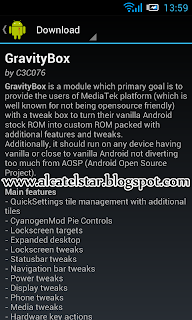
7. Here's the GravityBox Module download from button & install.

gravitybox module for xposed framework

xblast tools module xposed framework

8. After installation of Module you need and this to activate you will see notification with warning for activation.

modules for xposed framework

9. Now you have installed Xposed Framework & amazing Module GravityBox.Experiment with features inside and that's it like a playing game no any modification on apk:)
note: don't forget to reboot phone after playing with Module to take effect.
note: If you don't like this app you can easily uninstall as you go to Xposed Framework app and go to first option Framework then "Clean up".

for more information visit original source: http://forum.xda-developers.com/showthread.php?t=1574401
developer of Xposed Framework: rovo89