Yureka First Sale Details

Complete details on first sales of Yureka on 13th January, 2015


As we speculated earlier, a total of 10,000 units will be on sale tomorrow on Amazon India for the first ever slae of Yureka by YU Telecoms running Cyanogen OS. Though such large amount may still leave thousands of fans disappointed as the total registered customer is believed to be in Lacs. Though Rahul Sharma, CEO of newly found YU Telecom has assured that the numbers will increase multiple times in the subsequent sales.

You can read our complete buying guide to ensure success in the first sale here : How to buy Yureka from Amazon in one attempt


Accessories : 


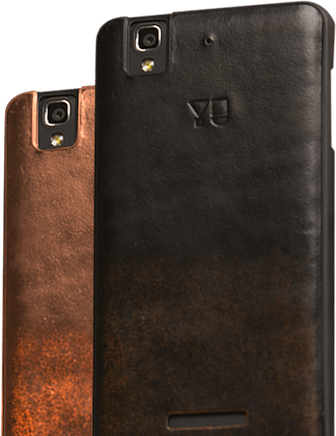
1) Free Back Cover


As announced during the launch event on 18th December a hand made genuine leather case worth ₹999 will be provided free to all those buying the phone on first sale.

A total of 7500 units of brown back cover and 2500 units of black back cover will be available tomorrow.
Although neither Amazon nor YU has clarified whether customers will choose the covers or they will randomly assigned.

We are trying to clarify the situation and update as soon as possible.

Update : The back covers will be given in a random manner, as the number of brown covers are more than black chances of getting brown one is high.
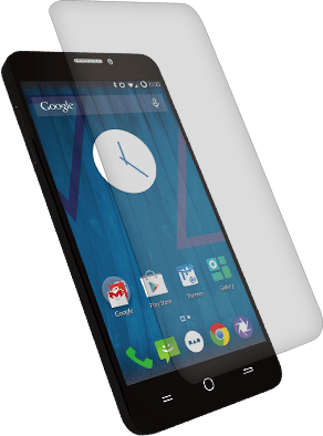


2) YU Tempered Glass Screen Guard for Yureka AO5510

  • Stain resistant oleophobic film
  • Robust tempered glass(7h hardness) with high flexibility(90 degree)
  • Scratch resistant and anti-shatter film

The screen guard will also be sale from tomorrow on Amazon separately it can be brought from here : Tempered Glass Screen Guard on Amazon

It will add extra protection to the already tough Corning Gorilla Glass 3 which comes with phone. It will be priced at ₹399.
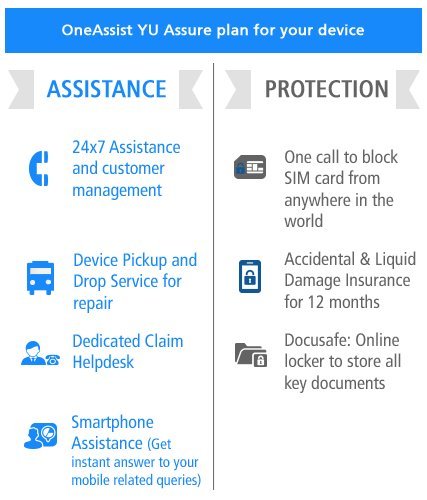


3) OneAssist YU Assure Accidental Damage and Liquid Damage Protection for YU Yureka Mobile


  • 24 x 7 assistance for all your device service needs
  • Accidental and liquid damage insurance up to Rs.9000
  • One call to block your SIM from anywhere in the world
  • Device pickup and drop service for repair
  • Smartphone assistance
  • Docusafe: Online storage of important documents up to 1GB
A must have insurance for the phone priced at only ₹365 with 83% discount on the actual price of  ₹2,199.

Read : Our Yureka Buying Guide


Got Any Questions : FAQs on Yureka


Complete Buying Guide: YU Yureka (A05510)

How to buy Yureka from Amazon : Complete Steps Explained

Note : This is a guide aimed at explaining the complete process involved in buying Yureka. If you're interested in knowing the best steps and tips to buy the Yureka sucessfully skip directly to Part 2.


Testimonials :


Also Read : FAQs : Frequently Asked Question on Yureka


Part 1 : Registration


Subscription confirmed
As Yureka is registration only device, first thing you need to do is to register for the sale on Amazon India website Register for Yureka.

Note : Registration and Subscription are same.


If you've successfully registered you will get a screen like this.
Part 1 is over, you may get an email from Amazon confirming your registration.

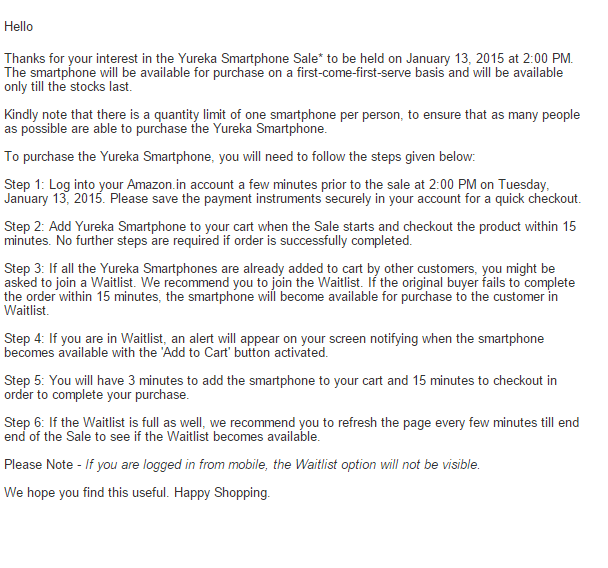
Registration Email Sample


If you want check your registration visit here : Check Registration


Part 2 : Participating in Sale


Before you read the actual steps, we advice you to do the following :

Update your delivery address and card details now ( if you plan to pay using credit/debit cards ) Change Your Address


Steps, tips and tricks to buy Yureka from Amazon


Steps as detailed by Amazon

Step 1 : Make sure you're logged into your Amazon Account minutes before the sale :  Login Here

You can use our sales countdown for accurate timing, here :Yureka Sales Countdown.

Step 2 : Close all other tabs and open the Yureka Sales Page, at 1:30 PM (or atleast five minutes before the sale) and you will be see a timer, do nothing, wait till 2PM and DO NOT REFRESH, when option comes add to the cart, you will have a 15 minute window to checkout the phone. If you checkout successfully the phone is yours, no other steps needed.

Step 3 : If you didn't managed to checkout the phone before the stocks are exhausted join the wait list and keep that window open and again DO NOT REFRESH. ( people have reported getting the phone even after 40 minutes, so don't lose hope and don't close the window or refresh)
Step 4 : If your wait list clears you will be notified, add the phone within 3 minutes and checkout.

Step 5 : Please wait till they announce end of sale on the Amazon sales page.

Note :

1. Wait list option won't be visible on mobile devices.

2. Only orders placed from Sales Page or the product page on the Deal widget will be successful. Orders from Wishlist, Customer Reviews and all other platforms/functionalities have been disabled.

Since the stocks are going to be limited you need to act quick if you want to be among the first to own the Yureka.

Also so far Amazon hasn't added the countdown, if they don't, you can use ours to make sure you're on time for the sale : Yureka Sales Countdown.


Also Read : Pros and Cons of Yureka sales model on Amazon

Good Luck.

Pros and Cons of Yureka Sales Model

Advantages and Disadvantages of Yureka Sales Model on Amazon


Pros and Cons of Amazon Yureka Sales Model

Pros:

1. Everyone registered has fair chance of getting the mobile.

2. As you need to checkout to complete your order not just add to cart, genuine buyers will have more successful orders.

3. Only 15 mins window for checkout means no time for Black Marketers to find their buyers and hence more genuine sales.

4. Waitlist will provide second chance for those who really want to buy the phone.

Cons :

1. Even though registration were closed early there is still limited stocks, with almost a month between announcement and sales there should have been more 100% stock availability.

2. Even though Amazon has added a waitlist feature it's absence on mobile devices will be frustrating for many as majority of users use mobile devices now a days.

Read : Our Complete Yureka Buying Guide

Participate in our contest : Yureka Support Page Contest.

Amigo Mix [6582] [4.4.2] Fast & Stable

Walton r3 did not get Amigo ui officially . 
I am presenting Amigo ui for walton primo r3 . 
Any 6582 kk user can port this for their device too .

Features :

1. Odexed rom to ensure more free ram and super fast performance . 
2. Stable for daily usage 
3. Dual 3g .
3. Pre-rooted and removed bloatwares .
4. Bugless ( Don't hesitate to inform me if you can find one )
5. Nova prime as default launcher  .
6. Lag free .
7. Better battery backup .
6. All other features of Amigo ui . (I can't describe more)


:::::::::::::::::::::: Necessary Tools & Rom For Primo R3 ::::::::::::::::
 
Rom Link :
click here

::::::: Procedure for Flashing a custom rom via CWM recovery :::::::


#go to cwm recovery by pressing (power button+ volume up button)
#select wipe/data factory reset >>> then select yes.
#Select wipe cache partition>>>then select yes.
#then select mounts and storage>format/system>yes format
#then select advanced option>>> then wipe dalvic cache and wipe battery stat.
#then Return to the main menu again.
#select Install from sd card > install zip from SD card > select –Custom Rom> yes.
#then a process will occur.
#wait untill it finished.
#then reboot your Primo R3
::::::: Procedure for Flashing a custom rom via TWRP recovery :::::::
# Power off your phone.
# Turn your phone on in recovery mode (by pressing VOLUME UP + POWER buttons).
# Go to TWRP  { Also known as Recovery Mode. }
# GO > WIPE> ADVANCED WIPE> SELECT - DALVIC CACHE, CACHE, DATA, ANDROID SECURE, SYSTEM AND THEN SWIPE TO WIPE
# THEN A PROCESS WILL START AND WAIT UNTILL IT FINISHED.
# THEN SELECT- BACK AND RETURN TO MAIN PAGE.
# NOW THE FINAL PART- SELECT - INSTALL> SEARCH YOUR ROM
# AND THEN SWIPE TO CONFIRM FLASH.
# WAIT UNTILL IT FINISHED.
# REBOOT YOUR PHONE/SYSTEM REBOOT
.
THANKS TO  : ALL TIME HITZ 


Screenshots :


Contact me  : Muhe


Stock ROMs for most Alcatel One Touch STAR, IDOL, IDOL MINI, POP C1 and others

Many people are looking for stock ROMs, because their Alcatel devices are bricked like bootloop after did some modifications on their device and they don't have a backup of stock firmware.
Here we will post most Alcatel One Touch Stock ROMs for thus who needed to flash back to their Alcatel One Touch.
Some ROMs are from forums and we don't know from what country are they.
We recommend to make a full backup of your device before to do anything even root or installing some apps.
If you don't know how to make a backup of your Alcatel device or any other Mediatek based device take a look at this guide: How to make backup of Alcatel device or Mediatek device
  1. Download Stock ROM for Alcatel STAR 6010x - link
  2. Download Stock ROM for Alcatel STAR 6010d - link(you need to upack with MTK DROID TOOLS)
  3. Download Stock ROM for Alcatel IDOL 6030x - link
  4. Download Stock ROM for Alcatel IDOL 6030a - link
  5. Download Stock ROM for Alcatel IDOL MINI 6012x - link
  6. Download Stock ROM for Alcatel IDOL MINI 6012d - link
  7. Download Stock ROM for Alcatel POP C1 - link
  8. Download Stock ROM for Alcatel Pixi 3 3.5 4009d - link
TWRP backup 6010d - link
TWRP backup 6010x - link
TWRP backup 6012x - link


Guide of How to flash stock ROM on Alcatel here's the full tutorial check this link: How to restore mediatek backup of Alcatel or any other Mediatek based device

Caution: don't use preloader and dsp_bl this files are specific for each device if you flash on your device it may brick your device completely.Just careful read guide of restoring there are everything explained.
Disclaimer: We are not responsible for bricked devices after using stock ROMs from this post.Do it at your own risk!

LIME LIGHT UI FOR WALTON PRIMO R3 KITKAT BASED BY KUASHA PRANTO

ROM Name- LIME LIGHT UI                                                             
 

Device- WALTON PRIMO R3

You can port it to other MT6582 Devices...


  FEATURES :

1. LIME LIGHT UI
2. NO BUGS ( IF YOU FOUND ANY LET ME KNOW )
3. SUPER FAST

4. CAMERA FULLY WORKED
5. SEMI 3D DAILER
6. TRANSFORMER BOOT LOGO AND ANIMATION
7. FULLY STABLE
8. BETTER THEN AOSP BASED OTHER ROM U CAN USE IT AS STOCK ROM
9. PRE ROOTED
10.ANDROID 4.4.4
11.THEME FULLY WORKED
12.AWSOME BOOT ANIMATION
13.VARIOUS TWEAKED FOR BETTER PERFORMACE
14.NO MORE LAG .. IF YOU USE LIME LIGHT UI BEFORE U KNOW WHAT I MEAN
15. SMART MOTION ADDED
16.TIMER SMS ADDED

Screenshot ::::


:::::::::::::::::::::: Necessary Tools & Rom For Primo R3 ::::::::::::::::

Root, Recovery Tools, For R3 -:


Rom Link -:
CLICK HERE

::::::: Procedure for Flashing a custom rom via CWM recovery :::::::


#go to cwm recovery by pressing (power button+ volume up button)
#select wipe/data factory reset >>> then select yes.
#Select wipe cache partition>>>then select yes.
#then select mounts and storage>format/system>yes format
#then select advanced option>>> then wipe dalvic cache and wipe battery stat.
#then Return to the main menu again.
#select Install from sd card > install zip from SD card > select –Custom Rom> yes.
#then a process will occur.
#wait untill it finished.
#then reboot your Primo R3

::::::: Procedure for Flashing a custom rom via TWRP recovery :::::::

# Power off your phone.
# Turn your phone on in recovery mode (by pressing VOLUME UP + POWER buttons).
# Go to TWRP  { Also known as Recovery Mode. }
# GO > WIPE> ADVANCED WIPE> SELECT - DALVIC CACHE, CACHE, DATA, ANDROID SECURE, SYSTEM AND THEN SWIPE TO WIPE
# THEN A PROCESS WILL START AND WAIT UNTILL IT FINISHED.
# THEN SELECT- BACK AND RETURN TO MAIN PAGE.
# NOW THE FINAL PART- SELECT - INSTALL> SEARCH YOUR ROM
# AND THEN SWIPE TO CONFIRM FLASH.
# WAIT UNTILL IT FINISHED.
# THEN WIPE CACHE/DALVIC CACHE.
# REBOOT YOUR PHONE/SYSTEM REBOOT.

CREDITS : ALL TIME HITZ ( MY ELDY  )


YU Yureka Unboxing

Yureka Unboxing


Yureka comes under the recycled card board box.

YUBox001

Inside of the box contains: 

YUBox002

Transceiver
Charger
Battery(2,500 mAh)
USB Cable
User Guide
Handsfree
Warranty Card
Screen Guard


Note : Since, this is the review unit so following things are not available which will be available in the actual retail unit. User Guide, Warranty Card, Screen Guard.

specifications as seen on the box

more details on the box